Sapling AI Detector: Features, Limits, and Accuracy
The Sapling AI Detector is an AI text checker that estimates whether a passage was likely written by a person or generated by a language model.
In this guide
Sapling AI Detector: Features, Limits, and Accuracy
The Sapling AI Detector is an AI text checker that estimates whether a passage was likely written by a person or generated by a language model. It can be useful for editors, educators, hiring teams, and content reviewers, but it should be treated as a screening tool rather than final proof. Sapling’s own guidance says detector scores can produce both false positives and missed detections, so human review still matters. (sapling.ai)
What does the Sapling AI Detector actually check?
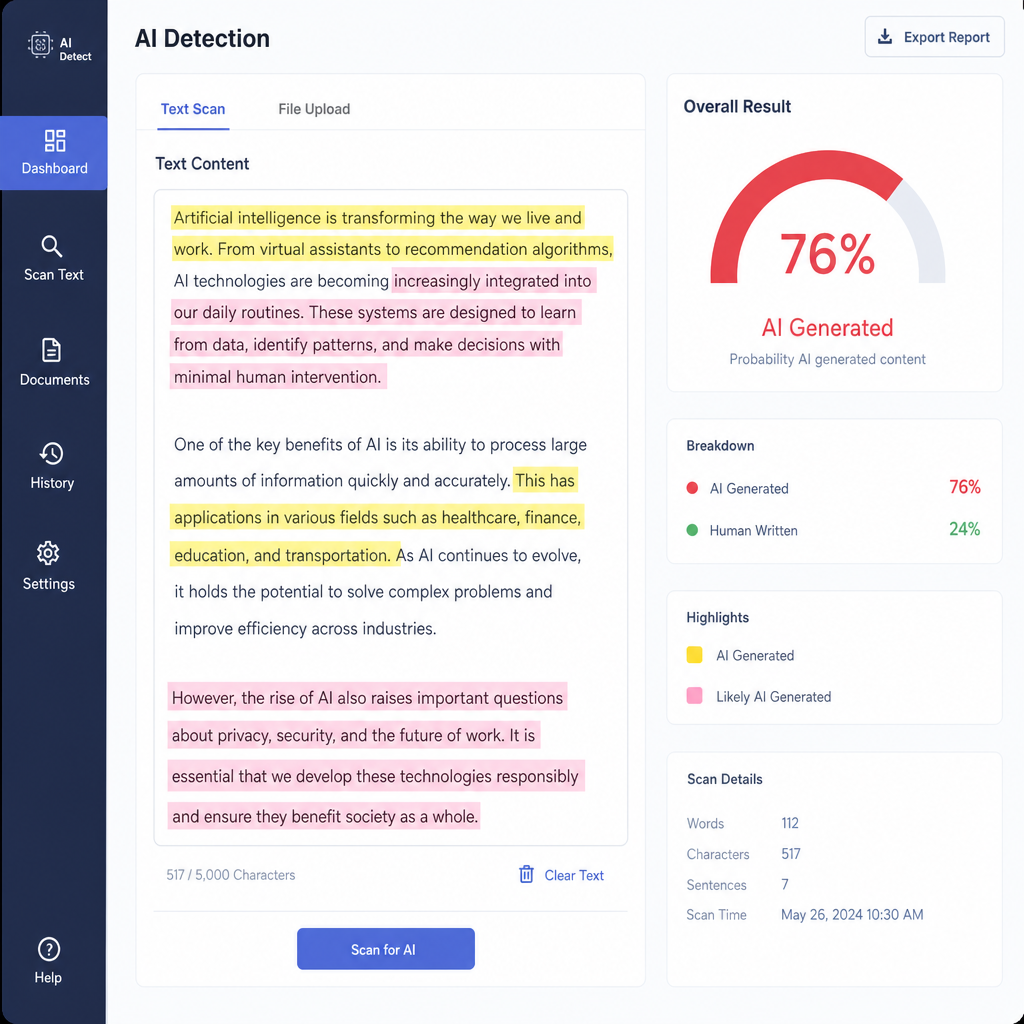
The sapling ai detector analyzes text and returns a probability-style score for AI generation. In the hosted tool, users can paste text, review an overall score, and see highlighted portions or sentence-level signals that may read as AI-written. Sapling notes that its detector becomes more accurate after about 50 words, which matters because very short samples rarely contain enough writing pattern to judge confidently. (sapling.ai)
For teams, the AI detector Sapling offers through its API goes further. The API can return a document score from 0 to 1, an AI-generated fraction, sentence scores, token probabilities, and an optional heatmap, making it more practical for workflows such as content moderation, job applications, reviews, or publishing checks. (sapling.ai)
Key features include:
- Overall AI probability to summarize the document-level result.
- Sentence-level scoring to show where the signal appears strongest.
- Token-level probabilities through the API for deeper analysis.
- PDF and DOCX support through text extraction before detection.
- Browser and API options for quick checks or scaled review workflows. (sapling.ai)
Its best use is triage, not judgment
A strong ai writing detector can help prioritize what deserves a closer look, but it cannot know an author’s process. Formulaic human writing may be flagged, while edited AI writing may slip through. That is why Sapling recommends using the score as one input in a broader review that may include sources, drafts, revision history, and a conversation with the writer. (sapling.ai)
This is especially important in schools, hiring, publishing, and compliance settings. A low score should not automatically clear a document, and a high score should not automatically accuse someone of misconduct. The practical value of any ai detector is in prompting better review, not replacing it.
How accurate is the AI detector?
Sapling says accuracy varies by dataset, text length, and decision threshold, so there is no single accuracy number that applies to every use case. Short text, generic wording, heavy editing, and document extraction issues can all affect results. The best way to evaluate the Sapling AI Detector is to test it on examples that match your real workflow. (sapling.ai)
Use this simple evaluation checklist:
- Collect known human-written and AI-generated samples from your own content type.
- Test enough examples to see patterns, not just one-off results.
- Track false positives and false negatives separately.
- Record text length, topic, threshold, detector version, and date.
- Decide in advance what a flagged result should trigger.
Practical takeaways for reviewers
People searching for “sapling ai,” “sapling ai ai detector,” or even the awkward phrase “sapling ai ai detector” usually want one thing: a fast way to judge whether text deserves scrutiny. Sapling can help with that, particularly when the writing sample is long enough and the reviewer understands what the score means. It is less reliable as a standalone verdict.
The smartest approach is balanced: use the sapling ai detector to surface signals, then apply human judgment before taking action. In that role, it can be a helpful ai text checker for modern content review without pretending AI detection is perfect.