Does Canvas Detect AI? What Canvas Actually Sees
Canvas does not act as a universal, built-in AI detector for every assignment.
In this guide
Does Canvas Detect AI? What Canvas Actually Sees
Canvas does not act as a universal, built-in AI detector for every assignment. In most schools, AI content detection in Canvas happens only when the institution or instructor enables a connected third-party tool, such as Turnitin or another document processor, and only for assignment types that tool can analyze. Canvas itself mainly records course activity, submissions, quiz events, and reports returned by external tools. (community.instructure.com)

Does Canvas detect AI by itself?
The short answer is usually no: Canvas is a learning management system, not a native AI writing detection engine. An accepted answer in the Instructure Community states that Canvas does not provide instructors with an AI-generated paper detection feature, while another explains that plagiarism or similarity scoring is handled by third-party integrations rather than Canvas itself. (community.instructure.com)
That distinction matters because students and instructors often use “Canvas” to mean the whole online classroom. If a paper is flagged inside SpeedGrader, the flag may appear in the Canvas workflow, but the analysis may have come from an integrated service. So when people ask, “does Canvas detect AI,” the more precise question is: what does Canvas use to detect AI in this specific course?
Defining characteristics of Canvas AI detection are:
- Not automatic across all courses: it depends on institutional settings, licenses, and assignment setup.
- Usually third-party powered: tools may return similarity, plagiarism, or AI writing detection reports into Canvas.
- Submission-dependent: file upload and text-entry assignments are the most common places where analysis is possible.
- Report-based, not proof-based: an AI score is a tool output, not a complete academic integrity finding.
- Visible according to permissions: instructors, students, and admins may see different report details depending on settings.
What Canvas actually sees
Canvas can see activity that happens inside Canvas: submissions, timestamps, page views, quiz events, course interactions, and data passed through approved integrations. For example, Canvas Recent History can show page view activity, including the Canvas feature viewed, the course item, the course name, and the viewed date. Canvas also provides an API for user page views that returns page view history in newest-to-oldest order. (community.instructure.com)
For quizzes, Canvas quiz logs can display statuses such as viewed, answered, stopped viewing, and resumed. The log can show when a student navigates away from a quiz page, opens another tab, closes the browser tab, or moves to a different program, but those events do not identify why the student left the quiz page. (community.instructure.com)
Canvas generally does not see what happens in a separate AI chatbot, private browser window, notes app, or word processor unless that activity is submitted, pasted, uploaded, captured by a proctoring tool, or otherwise integrated into the school’s technology environment. In other words, Canvas may show patterns and records, but it does not magically watch every outside writing step.
How does Canvas detect AI when a tool is enabled?
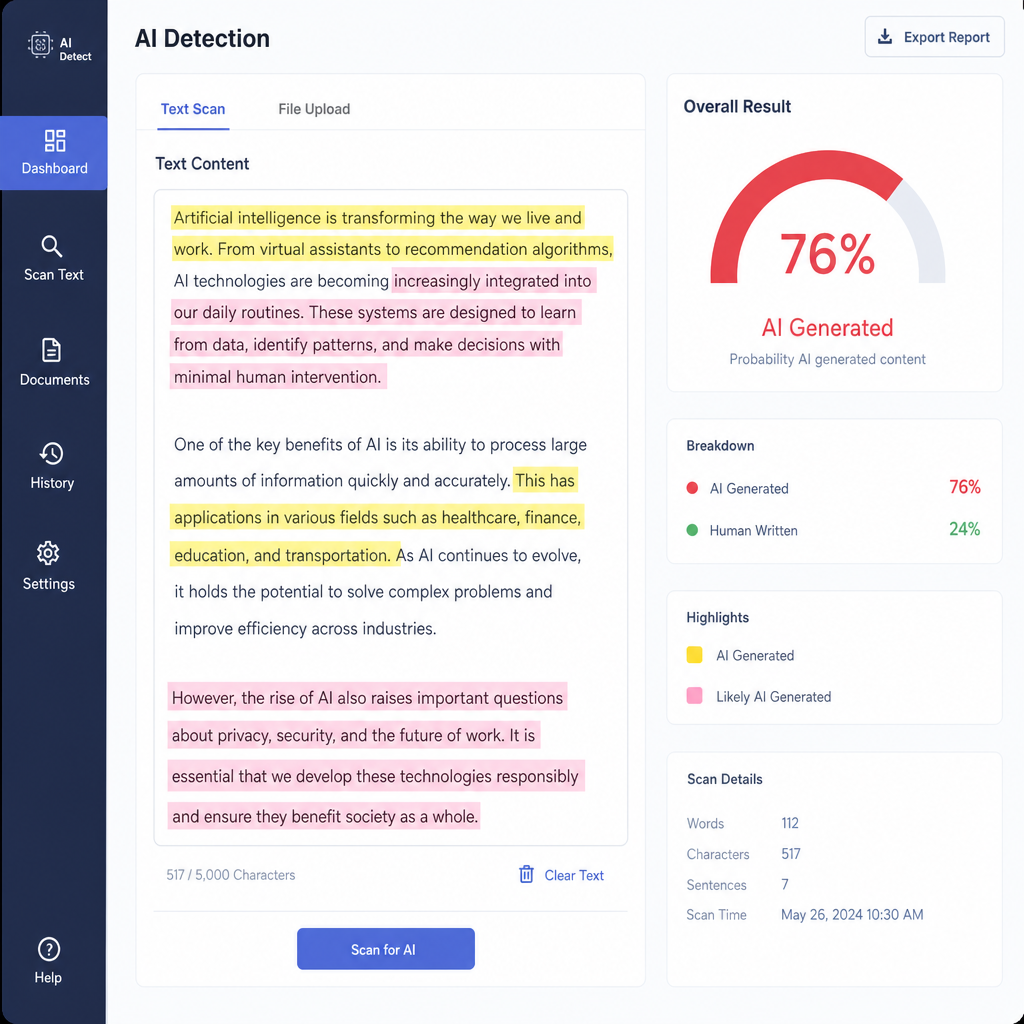
When AI detection tools are enabled, Canvas typically sends the submitted file or text-entry assignment to an external service, receives a report, and displays that report in the grading workflow. Instructure’s Document Processor FAQ says third-party tools can receive Canvas submissions, check the work, and send reports back to SpeedGrader; if a tool supports both similarity detection and AI detection, it can return both kinds of reports. (community.instructure.com)
The older Canvas plagiarism detection platform also supports file upload and text-entry submissions, and Canvas originality reports can store an external originality score tied to a submitted file. These systems explain why a score may look like a Canvas result even when the analysis comes from another vendor. (developerdocs.instructure.com)
A typical workflow looks like this:
- The instructor creates an assignment and enables a review tool if the institution provides one.
- The student submits work as a file or text entry.
- Canvas passes the submission to the configured detection or document-processing tool.
- The tool analyzes the submission for similarity, AI writing, paraphrasing, or other supported signals.
- A report appears in Canvas, often in SpeedGrader, depending on settings and permissions.
Canvas AI tools are not the same as AI detection tools
Canvas now includes optional IgniteAI features for institutions that opt in, including tools for rubric generation, discussion summaries, course search, study tools, translations, quiz question authoring, and data queries. Those Canvas AI tools are designed to support teaching, learning, and course management; they are not the same thing as an AI detector that judges whether a student wrote an essay with generative AI. (community.instructure.com)
This is where the keyword “canvas ai tools” can be confusing. A school may have AI-powered features in Canvas and still not have AI writing detection enabled. Conversely, a school may have no visible generative AI features for students but still use a third-party detector on assignment submissions.
What AI detection reports mean
AI writing detection is probabilistic. Turnitin’s AI Writing Report, for example, describes its percentage as the amount of qualifying long-form prose that its model determines could be AI-generated or AI-generated and then modified by a paraphrasing or bypass tool. Turnitin also says the AI writing percentage is separate from the similarity score. (guides.turnitin.com)
That wording is important: “could be” is not the same as “definitely is.” Turnitin’s own guide notes that false positives are possible and that lower AI-detection ranges can be less reliable, which is why some low scores may be shown differently or not surfaced as a normal percentage. (guides.turnitin.com)
Independent guidance is cautious too. NIST notes that synthetic text detection is still a work in progress, that detector performance can decrease with paraphrasing and other real-world conditions, and that false positives in academic settings can have serious consequences. (airc.nist.gov)
Practical examples and common misconceptions
Understanding what Canvas actually sees helps reduce panic and improves academic integrity conversations. The best response is not to guess based on rumors, but to check the course policy, assignment instructions, syllabus, and any report visibility your instructor provides.
Common scenarios include:
- Essay submitted through Canvas: Canvas records the submission, and an enabled third-party tool may analyze the text.
- Quiz opened in Canvas: quiz logs may show viewing, answering, leaving, and returning events, but not the content of an outside website unless another tool captures it.
- Draft written in Google Docs or Word: Canvas does not automatically see the drafting process unless the document history is shared or submitted.
- AI used with permission: the issue is usually whether use followed the course policy and whether it was cited or disclosed as required.
- AI score appears in SpeedGrader: the score likely comes from an integrated ai content detection provider, not from Canvas acting alone.
The safest takeaway
If you are wondering what does Canvas use to detect AI, the answer depends on your institution’s configuration. Canvas can display reports from external ai detection tools, record submission and activity data, and show quiz or page-view events, but it is not a universal mind-reading system for AI writing detection. For students, the safest path is to follow the AI policy, keep drafts and notes, cite sources carefully, and ask before using generative AI. For instructors, AI scores should be treated as one signal among many, not as a final verdict.