Exploring ChatGPT's Capabilities in Video Analysis
ChatGPT video analysis is the use of ChatGPT to interpret, summarize, question, and reason about video-related information, such as uploaded video files, still
In this guide
Exploring ChatGPT's Capabilities in Video Analysis
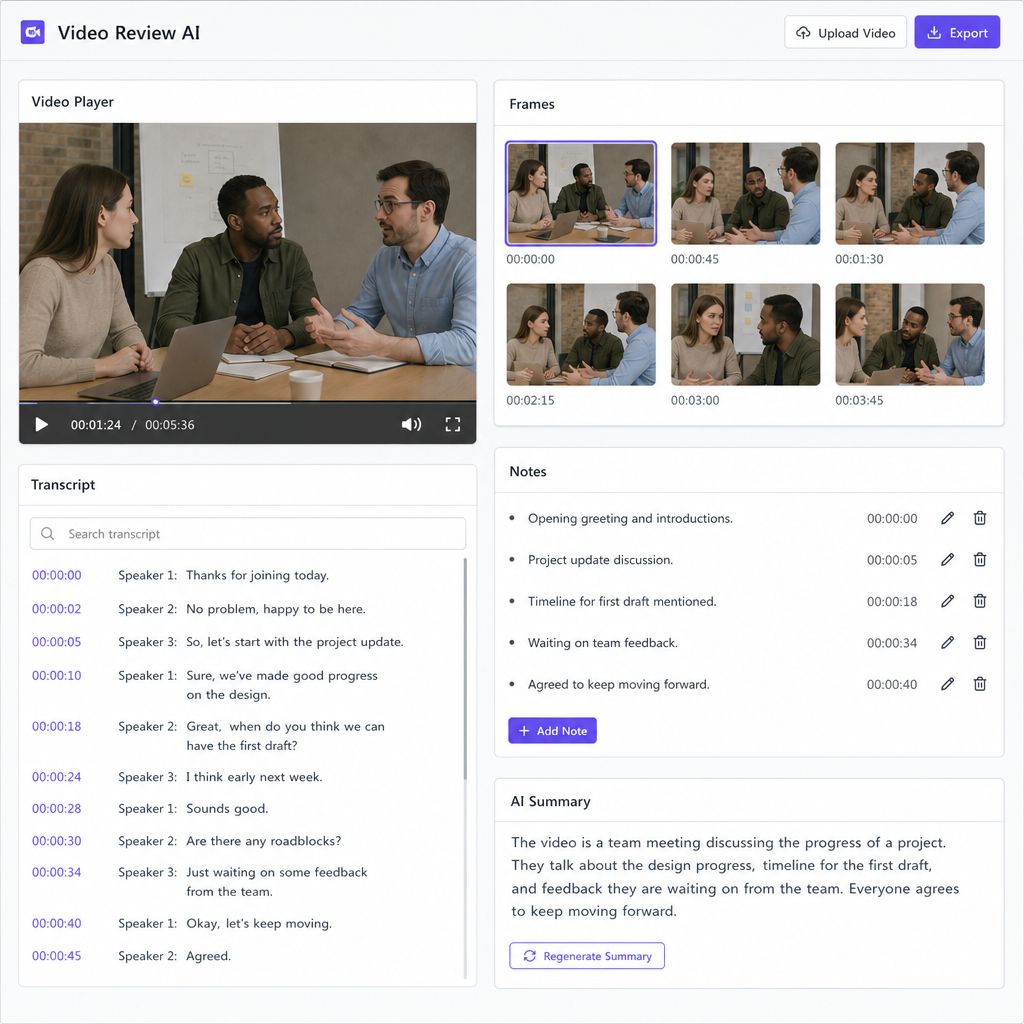
ChatGPT video analysis is the use of ChatGPT to interpret, summarize, question, and reason about video-related information, such as uploaded video files, still frames, transcripts, audio recordings, or metadata. In plain terms, ChatGPT can help you understand what a video contains, but the quality of the result depends on what you provide, which model or tools are available, and whether the system can access the visual, audio, and textual parts of the video. OpenAI’s current help materials state that ChatGPT can accept video files as attachments through supported upload methods, while also warning that analysis can be incomplete or inaccurate. (help.openai.com)
For creators, marketers, researchers, educators, and product teams, this makes ChatGPT useful as one of several video analysis tools—not as a perfect replacement for human review. It can turn video content analysis into summaries, notes, scene descriptions, captions, outlines, issue lists, and follow-up questions. The key is knowing what ChatGPT can actually “see,” what it may miss, and how to prepare the video so the answer is grounded in the content rather than guesswork.
What is ChatGPT video analysis?
ChatGPT video analysis means asking ChatGPT to examine video material and produce a useful interpretation of it. That interpretation might be a short summary, a timestamped outline, a list of visual elements, a transcript-based explanation, a critique of the message, or a structured breakdown of what happens in the clip.
The term can sound more advanced than the everyday workflow often is. In many cases, you are not asking ChatGPT to “watch” a video like a person sitting through it in real time. You are giving it a video file, selected frames, screenshots, audio, a transcript, or a link-accessible source, then asking it to reason over the available inputs. ChatGPT’s broader capabilities include working with text, images, files, audio, data analysis, search, and deep research, depending on plan, model, settings, and tool availability. (help.openai.com)
At its best, ChatGPT acts like a flexible analysis layer. It can help you move from raw video to usable understanding: what the video is about, what moments matter, what claims are made, what visual details appear, and how the content could be repurposed or improved. At its weakest, it may miss sections, misunderstand audio, overlook small on-screen details, or infer more than the source supports. That is why the most reliable use of AI for video is guided, specific, and reviewed by a human.
The defining characteristics of ChatGPT video analysis
A clear definition matters because people use “video analysis” to mean several different things. One person may want a summary of a webinar. Another may want visual inspection of a product demo. A third may want to know whether ChatGPT can analyze YouTube videos from a pasted link. These are related, but they are not identical tasks.
ChatGPT video analysis usually has these defining characteristics:
- Multimodal input: The analysis may involve visual frames, uploaded video, audio, transcripts, documents, captions, thumbnails, comments, or web pages connected to the video.
- Natural-language output: Instead of only returning labels or raw data, ChatGPT can explain the video in paragraphs, tables, bullets, scripts, checklists, or recommendations.
- Conversational follow-up: You can ask narrower questions after the first response, such as “What objections did the speaker address?” or “Which scenes show the product interface?”
- Tool-dependent access: ChatGPT’s ability to analyze a video depends on whether video upload, file tools, image understanding, audio handling, web search, or other features are available in the session.
- Best-effort interpretation: OpenAI notes that analysis of uploaded videos may be incomplete or inaccurate, so important conclusions should be checked against the source. (help.openai.com)
- Practical transformation: The result is often not just “what is in the video,” but a usable asset: notes, captions, summaries, clips to review, SEO ideas, training material, or QA findings.
This is different from traditional computer vision systems that may be built to detect objects, track motion, or classify events at scale. ChatGPT is especially useful when the goal is interpretation and communication: explaining what the video means, organizing it for a person, and connecting it to a task.
How does ChatGPT analyze videos?
ChatGPT analyzes videos by reasoning over the parts of the video it can access, which may include the uploaded video itself, sampled frames, screenshots, audio, a transcript, or related web content. If the system has video attachment support in your account and interface, you may be able to upload a video directly; if not, you can still often get useful results by supplying a transcript, screenshots, key frames, or a written description. OpenAI’s help center distinguishes video attachments from other inputs and notes that availability varies by platform, upload method, and account. (help.openai.com)
The process is easiest to understand as a layered workflow. The more complete and organized the source material, the better the analysis can be. A transcript helps ChatGPT understand speech. Screenshots or frames help it understand visual details. A written prompt tells it what to pay attention to. A timestamp list helps it keep the response tied to specific parts of the video.
A practical workflow looks like this:
- Provide the video or supporting material. Upload a supported video file where available, or provide a transcript, audio file, screenshots, key frames, captions, or notes.
- State the goal clearly. Ask for a summary, scene-by-scene breakdown, content critique, compliance review, training notes, repurposing ideas, or specific facts.
- Define the level of detail. Tell ChatGPT whether you want a short executive summary, a detailed outline, timestamps, a table, or a list of issues.
- Ask targeted follow-up questions. Narrow the task: “What happens after the product demo starts?” or “Which claims need fact-checking?”
- Verify important findings. Review the original video before relying on conclusions, especially for legal, medical, financial, safety, accessibility, or brand-sensitive decisions.
This workflow is important because video is dense. A five-minute clip can contain speech, music, facial expressions, on-screen text, product visuals, logos, transitions, implied claims, and context that only appears briefly. ChatGPT can help sort that complexity, but it should be prompted like an analyst, not treated like a magic viewer.
What ChatGPT can do with video content
The most useful applications of ChatGPT video analysis are usually knowledge-work tasks. It can help people understand, summarize, organize, repurpose, and evaluate video content faster. The more specific your instruction, the more helpful the output tends to be.
Common use cases include:
- Summarizing long videos: Turn a meeting, lecture, webinar, interview, tutorial, or presentation into concise notes.
- Creating timestamped outlines: Break a video into sections such as introduction, problem, demo, examples, objections, and conclusion.
- Extracting talking points: Identify key arguments, recurring themes, product benefits, audience questions, or speaker positions.
- Generating captions or transcript-based assets: Use a transcript to draft captions, social posts, blog outlines, email recaps, or learning materials.
- Reviewing visual content: Ask what appears in screenshots or sampled frames, such as interface elements, slide text, packaging, settings, or visual inconsistencies.
- Improving creative work: Get feedback on pacing, clarity, story structure, calls to action, thumbnail-message alignment, or repurposing opportunities.
- Supporting accessibility: Draft alt text, plain-language summaries, chapter labels, or descriptive notes that make the video easier to navigate.
- Comparing versions: Upload or describe multiple cuts and ask what changed in message, structure, tone, or completeness.
For example, a marketing team might use ChatGPT to summarize a product launch video, identify quotable moments, and turn the main points into a blog outline. A teacher might use it to convert a recorded lecture into study notes and comprehension questions. A customer success team might analyze a training recording and extract steps, warnings, and follow-up tasks. These examples show why video content analysis is often less about “detecting everything in the footage” and more about making video easier to understand and reuse.
The role of GPT-5 and newer vision-capable models
Many users ask, “can ChatGPT 5 analyze videos?” The practical answer is: ChatGPT powered by GPT-5 can support strong text-and-vision workflows, and ChatGPT may also support video attachments depending on your account, platform, and tools. OpenAI describes GPT-5 as a text-and-vision model and lists GPT-5 as a ChatGPT model, while its Help Center separately states that ChatGPT can accept video file attachments through supported upload methods. (openai.com)
That distinction matters. “GPT-5 has vision” does not automatically mean every ChatGPT session, every app version, or every API workflow will process raw video in the same way. In user-facing ChatGPT, video support may appear as an attachment feature. In developer workflows, video-related analysis may require preparing inputs such as frames, images, transcripts, or metadata, depending on the endpoint and model capability. OpenAI’s model documentation also separates chat models from specialized video generation models, which is a reminder that generating video and analyzing video are different tasks. (platform.openai.com)
A safe way to think about it is this: GPT-5-level reasoning can make analysis more useful, but the input pipeline still matters. If ChatGPT receives only a transcript, it can analyze speech but not visual details. If it receives only screenshots, it can discuss visible content but not the full sequence or audio. If it receives an uploaded video, it may be able to use tools to analyze it, but the result still requires review.
Can ChatGPT analyze YouTube videos?
ChatGPT can sometimes help analyze YouTube videos, but a YouTube link is not the same as a guaranteed full video upload. If ChatGPT has web search available, it may be able to find public information related to a video, such as the page, title, description, source material, or accessible text; OpenAI describes ChatGPT search as a way to look up current information from the web with relevant sources. (help.openai.com)
For reliable analysis, you should not assume ChatGPT can watch every second of a YouTube video from the URL alone. The better approach is to provide the actual material you want analyzed: a transcript, captions, notes, screenshots, selected timestamps, or the video file if you have rights to use and upload it. This reduces guesswork and gives ChatGPT a clearer basis for its answer.
Use this decision guide:
|
If you have... |
Best way to ask ChatGPT |
What to expect |
|---|---|---|
|
A YouTube URL only |
Ask for publicly available context or a high-level research summary |
Useful if web-accessible information is available, but not a guaranteed full video analysis |
|
A transcript |
Ask for summary, claims, structure, quotes to verify, or content repurposing |
Strong analysis of spoken content, weak visual analysis |
|
Screenshots or key frames |
Ask for visual description, on-screen text review, design critique, or scene notes |
Good for visible details, not complete motion or audio |
|
A video file |
Upload it where supported and ask for a specific analysis task |
Potentially richer analysis, but still best-effort and review-dependent |
|
Captions plus timestamps |
Ask for chaptering, learning notes, highlights, or editing recommendations |
Good for structured content workflows |
So, can ChatGPT analyze YouTube videos? Yes, it can help, especially when you provide supporting material. But for detailed, accurate video analysis, the strongest workflow is not “paste a link and hope.” It is “provide the video evidence and ask a focused question.”
ChatGPT versus dedicated video analysis tools
ChatGPT belongs in the broader category of AI for video, but it is not identical to every tool in that category. Dedicated video analysis tools may be designed for narrow functions such as object detection, motion tracking, surveillance review, sports tagging, brand safety scanning, media asset management, or automated editing. ChatGPT is strongest when the output needs interpretation, explanation, or language-based transformation.
Think of ChatGPT as an analysis and reasoning assistant around the video. It can connect what appears in the content to an audience goal, communication objective, lesson plan, marketing strategy, research question, or review checklist. That makes it especially useful after the first layer of extraction has happened: once you have transcripts, frames, captions, or scenes, ChatGPT can organize and explain them.
A practical comparison:
|
Capability |
ChatGPT |
Dedicated video analysis tools |
|---|---|---|
|
Summaries and explanations |
Strong when given accessible content |
Varies; many tools focus on detection, not explanation |
|
Follow-up questions |
Strong conversational workflow |
Often limited to filters, dashboards, or reports |
|
Object or motion tracking at scale |
Not usually the main strength |
Often stronger for specialized use cases |
|
Creative repurposing |
Strong for scripts, posts, outlines, and captions |
Varies by tool |
|
Timestamp precision |
Depends on input quality and tool access |
Often stronger when built for frame-level tagging |
|
Human review needs |
Still required for important decisions |
Still required, especially in high-stakes contexts |
This comparison helps set expectations. If you need to know whether a speaker’s argument is clear, ChatGPT may be the right tool. If you need frame-accurate tracking of a ball, vehicle, or manufacturing defect, a specialized system may be more appropriate. Many teams use both: dedicated tools to extract structured video signals and ChatGPT to interpret, summarize, and communicate the findings.
Strong prompts improve video content analysis
The biggest mistake people make with ChatGPT video analysis is asking a vague question about a complex video. “Analyze this video” gives the model too much room to choose the wrong focus. A strong prompt defines the role, goal, evidence, format, and review standard.
Use a prompt like this when accuracy matters:
Analyze this video for [purpose]. Focus on [specific elements]. If you are unsure or cannot inspect part of the video, say so. Return the answer as [format]. Separate confirmed observations from interpretations or recommendations.
Here are more practical prompt examples:
- For a webinar: “Summarize the webinar into an executive brief, a timestamped agenda, key takeaways, audience questions, and follow-up actions.”
- For a product demo: “Identify the product features shown, the customer problem each feature addresses, and any moments where the explanation may be unclear.”
- For a YouTube transcript: “Analyze this transcript for topic clusters, search intent, repeated phrases, and sections that could become short-form clips.”
- For visual review: “Review these frames for on-screen text, interface elements, visual inconsistencies, and anything that may confuse a first-time viewer.”
- For training content: “Turn this video transcript into a step-by-step job aid, a checklist, and five knowledge-check questions.”
- For compliance review: “List claims made in the video that should be verified. Do not judge whether they are true unless evidence is included.”
Notice the pattern: each prompt gives ChatGPT a job. That job is not simply to watch. It is to extract, organize, evaluate, or transform the content in a defined way.
Benefits of using AI for video analysis
The main benefit of using AI for video analysis is speed of understanding. Video is often slow to review because it is locked in time: you have to play it, pause it, rewind it, and take notes. ChatGPT can help convert that time-based content into structured text that is easier to search, skim, discuss, and reuse.
The second benefit is flexibility. One video can become many outputs: an outline, a summary, a blog post brief, a social caption set, a training checklist, a meeting recap, a list of unanswered questions, or a critique of clarity. This is why ChatGPT is useful for content teams that need to make more from existing footage without starting from scratch.
The third benefit is conversational exploration. With many traditional video analysis tools, you configure a report and read the result. With ChatGPT, you can ask follow-up questions: “What did the speaker say about cost?”, “Which section should be cut?”, “What is the clearest 30-second segment?”, or “What would a beginner misunderstand?” That back-and-forth can make analysis more practical and less mechanical.
The benefits are strongest when the video has a knowledge or communication purpose. Meetings, training sessions, sales calls, lectures, tutorials, product demos, interviews, and explainers are especially good candidates because much of their value can be represented in language.
Limitations, risks, and what ChatGPT may miss
ChatGPT’s video analysis has real limitations. OpenAI specifically cautions that ChatGPT may use tools to analyze uploaded videos, but the analysis can be incomplete or inaccurate and may not cover the whole video or correctly interpret its audio. (help.openai.com)
That warning should shape how you use it. If the output is for brainstorming, drafting, education, or internal review, a best-effort analysis may be enough. If the output affects safety, legal claims, medical guidance, financial decisions, hiring, discipline, public accusations, or compliance, human verification is essential.
Common limitations include:
- Incomplete coverage: ChatGPT may not analyze every frame or every moment of a long video.
- Audio errors: Transcription or speaker identification may be imperfect; OpenAI also notes that transcripts can contain errors and speaker identification may be unreliable for recordings. (help.openai.com)
- Missed visual details: Small text, quick cuts, background objects, gestures, or subtle changes may be overlooked.
- Context gaps: A clip may require external context that is not in the video itself.
- Overconfident wording: Like other AI systems, ChatGPT can present plausible-sounding interpretations that need verification.
- Access limits: File upload, video attachment, search, connectors, and audio capabilities vary by plan, platform, region, settings, and account.
- Privacy concerns: Uploaded videos may contain faces, voices, locations, internal data, customer information, or confidential material, so teams should follow their organization’s data rules.
A good rule is to ask ChatGPT to label uncertainty. Add instructions such as “separate observed facts from inferences,” “state what you could not determine,” or “flag anything that needs human review.” This makes the output more honest and easier to audit.
What to include when asking ChatGPT to analyze a video
For the best result, treat your prompt like a brief for a human analyst. The more context you provide, the more useful the answer becomes. You do not need a long prompt every time, but you should include enough information to prevent the model from guessing your goal.
Use this checklist:
- The source material: video file, transcript, audio recording, screenshots, frames, captions, or notes.
- The purpose: summary, critique, SEO planning, accessibility, compliance, editing, education, sales enablement, research, or documentation.
- The audience: executives, customers, students, beginners, editors, legal reviewers, developers, or social media viewers.
- The desired format: bullet summary, table, timestamped outline, checklist, script, content brief, or action list.
- The level of detail: quick overview, detailed analysis, scene-by-scene notes, or only high-priority findings.
- The evidence standard: confirmed observations only, transcript-backed claims, visual-only notes, or clearly labeled interpretation.
- The constraints: word count, tone, brand guidelines, platform limits, terminology, or anything the response should avoid.
A weak prompt says: “Can ChatGPT analyze videos? Analyze this.” A strong prompt says: “Analyze this 12-minute product demo for a landing page rewrite. Focus on customer pain points, product benefits shown on screen, unclear explanations, and moments that could become short clips. Return a table with timestamps, observations, and recommendations.” The second prompt gives ChatGPT a target, so the response is more likely to be useful.
Practical examples of ChatGPT video analysis
The easiest way to understand the concept is to see what it can produce. Below are practical examples that show where ChatGPT fits into real video workflows.
- Meeting recap: Upload or provide a recording transcript and ask for decisions, open questions, action items, risks, and owners.
- Lecture notes: Turn a class recording into definitions, examples, study questions, and a short review guide.
- Sales call review: Ask ChatGPT to identify customer objections, competitor mentions, buying signals, and follow-up opportunities from a transcript.
- Tutorial improvement: Provide the video or transcript and ask where a beginner might get lost, which steps need clearer labels, and what should be added.
- YouTube SEO planning: Use a transcript and description to generate chapters, title ideas, keyword themes, and a content brief without pretending the AI watched inaccessible footage.
- Creative editing review: Share key scenes and ask which moments feel repetitive, which transitions need context, and where the call to action should appear.
- Accessibility support: Ask for descriptive summaries, chapter labels, alt text for key frames, and simplified notes for people who cannot watch the full video.
- Research synthesis: Use ChatGPT search or deep research to gather public context around a video topic, then combine that with your own transcript or footage notes. OpenAI describes deep research as a tool for multi-step research that gathers, summarizes, and documents sources. (help.openai.com)
These examples also reveal the boundary of the tool. ChatGPT is not only answering “what happened?” It is helping decide what the video means for a specific person and task.
Common misconceptions about ChatGPT and video
Misunderstandings about ChatGPT video analysis usually come from treating all AI video tasks as the same. A model that can reason about images, files, and language may still have limits around video length, audio interpretation, frame coverage, and direct access to online platforms.
Here are the most common misconceptions:
- “If I paste a YouTube link, ChatGPT will watch the whole video.” Not necessarily. A link may provide public context, but detailed analysis is stronger when you provide a transcript, frames, or the video file where permitted.
- “Video analysis is always frame-perfect.” ChatGPT is better understood as a reasoning and summarization assistant, not a guaranteed frame-by-frame measurement system.
- “A transcript is the same as the video.” A transcript captures speech, but it may miss gestures, visuals, demonstrations, slides, tone, music, and on-screen text.
- “If ChatGPT gives a confident answer, it must be correct.” Confidence is not verification. Important claims should be checked against the original source.
- “All plans and apps work the same way.” OpenAI notes that availability can vary by plan, workspace settings, region, client version, selected model, platform, and upload method. (help.openai.com)
- “Video generation and video analysis are the same.” They are different. OpenAI’s video API documentation focuses on generating video with Sora models, while ChatGPT video analysis is about interpreting supplied content. (platform.openai.com)
Clearing up these misconceptions helps users get better results. The goal is not to lower expectations; it is to make the workflow more dependable.
Best practices for reliable results
Reliable ChatGPT video analysis comes from combining good source material, precise prompts, and human review. This is especially true when the video is long, technical, sensitive, or intended for publication.
Follow these best practices:
- Start with the clearest source. If speech matters, provide a transcript or supported audio. If visuals matter, provide the video, screenshots, or frames. If timing matters, include timestamps.
- Ask for uncertainty to be labeled. Require phrases such as “not visible,” “not provided,” “inferred,” or “needs verification.”
- Use structured outputs. Tables, chapters, checklists, and action lists are easier to review than long paragraphs.
- Break long videos into sections. Analyze a long webinar, class, or interview in parts, then ask for a combined synthesis.
- Keep rights and privacy in mind. Only upload or share video content you are allowed to use, and avoid exposing confidential or sensitive information unnecessarily.
- Review before publishing. Treat ChatGPT’s analysis as a draft or assistant output, not the final authority.
A useful final prompt is: “Now audit your own analysis. What parts are directly supported by the supplied video or transcript, what parts are interpretations, and what should I manually verify?” This pushes the response toward transparency and makes it easier to trust the parts that are well supported.
The bottom line on ChatGPT’s video analysis capabilities
ChatGPT can analyze videos in a practical, task-focused sense: it can help summarize, interpret, organize, critique, and repurpose video material when it has access to the right inputs. OpenAI’s current documentation supports video attachments in ChatGPT through supported upload methods, but it also makes clear that results may be incomplete or inaccurate, so users should verify important details. (help.openai.com)
The best way to use ChatGPT for video analysis is to be specific. Provide the video, transcript, frames, or context it needs; explain the outcome you want; ask for a structured response; and review the answer against the original footage. Used that way, ChatGPT becomes a powerful assistant for video content analysis—not because it removes human judgment, but because it helps people get from raw footage to clear understanding faster.